
Step 1: Download the Plugin #
After purchase, download the gridxpert.zip file from your Envato/CodeCanyon account:
- Go to CodeCanyon.net → Downloads
- Click Download next to WP Post Grid
- Choose “Installable WordPress file only”
Step 2: Upload to WordPress #
- Log in to your WordPress admin dashboard
- Go to Plugins → Add New
- Click the Upload Plugin button at the top
- Choose the downloaded
gridxpert.zipfile - Click Install Now
Step 3: Activate the Plugin #
- After installation, click Activate Plugin
- You’ll now see “WP Post Grid” in your WordPress sidebar
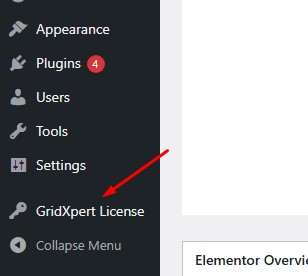
Next, activate your license:
- Go to WP Post Grid → License
- Enter your Envato purchase code
- Click Activate License
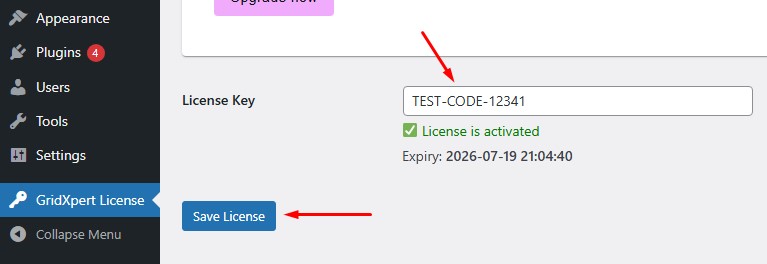
Your plugin is now ready to use!


